
Support & downloads
Everything you need to run your PUWMA.
Quickstart guides, answers to common questions, how-to videos and the software that works alongside your kit.
Quickstart guidesFAQsVideosSoftwareManualsQuickstart guides
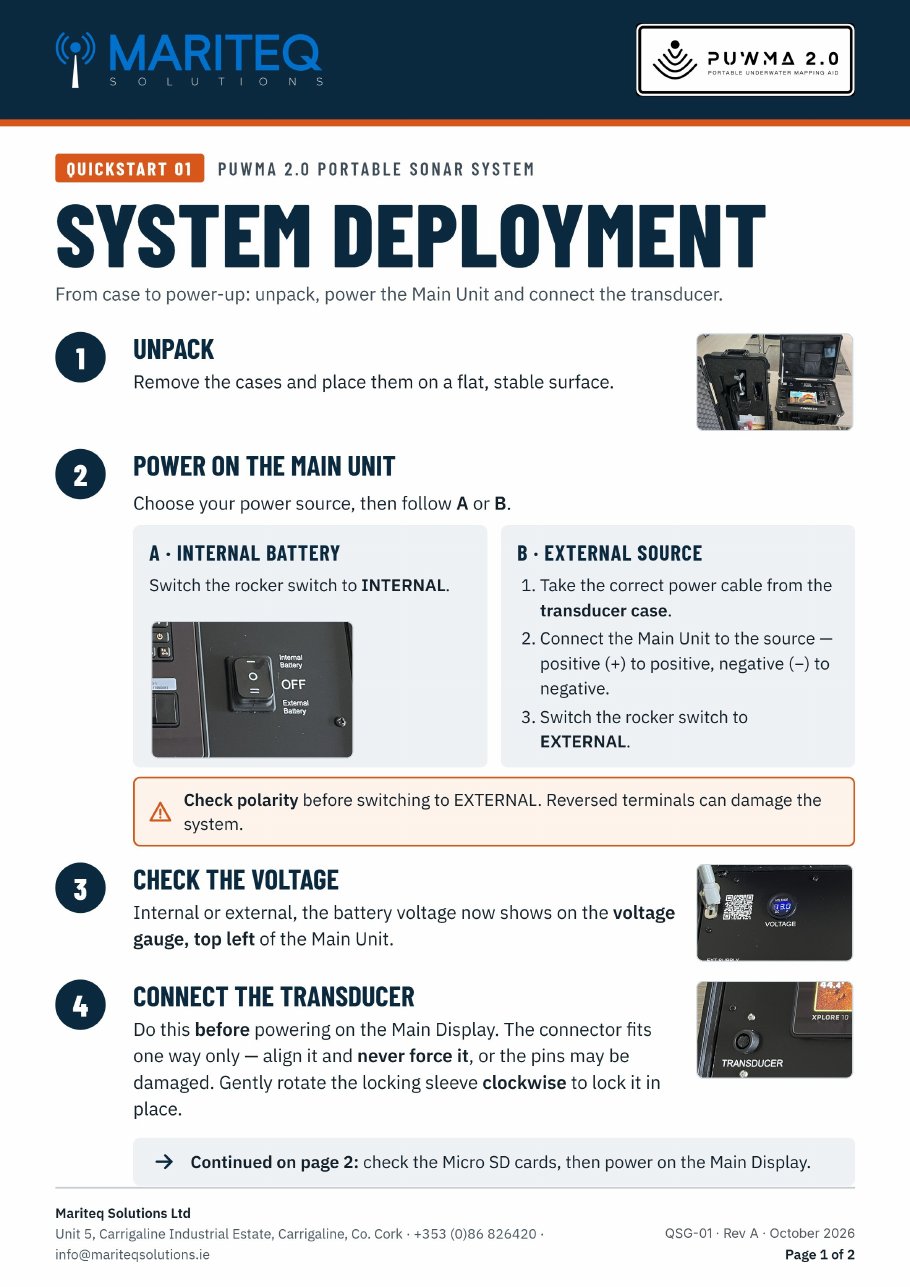
Quickstart 01 · Rev A · PDF · 2 pages · 1.8 MB
PUWMA 2.0 — System deployment
From case to power-up: unpack, power the Main Unit, check the voltage, connect the transducer, fit the Micro SD cards and power on the display. Includes a deployment checklist.
FAQs
How is PUWMA powered?
From its internal battery, or an external 9–36 VDC supply selected with the Internal / External switch. The battery charges from 220 VAC.
What comes in the kit?
A control case with the imaging display, battery and charging, plus a long case with the clamp mount, transducer pole and cables.
Is training included?
Training can be included as part of the original quotation, or discussed at a later stage once you have taken delivery of your kit. It can be delivered at your location or at our offices in Carrigaline, with quick access to Cork Harbour.
Can I export my sonar data?
Yes, in several ways. Use the One-Boat Network app to share waypoint data instantly, or remove the microSD card to share sonar recordings and snapshots quickly. With more advanced tools such as ReefMaster Sonar Viewer and ReefMaster 2.0, you can share sonar mosaics, KML files for Google Earth, or GPX data with other teams arriving on scene.
Are charts included?
Yes, every unit ships with a full Navionics package.
Do you service the kit?
Yes. An annual service is available, and Mariteq handles sales, servicing and repairs.
Videos
Watch PUWMA setup, deployment and imaging videos on our YouTube channel.
Software
Apps and desktop programs that work alongside your PUWMA. All are made by third parties and downloaded from their own sites or app stores.

VictronConnect
by Victron Energy · Free
Connects to the PUWMA 2.0 smart charger over Bluetooth. Use it to monitor battery charging cycles and confirm the battery’s state of charge (SOC) before you deploy.
iOS, Android, Windows, macOS, Linux · Apple App Store, Google Play or Victron’s website

Navionics Chart Installer
by Navionics / Garmin · Free
Desktop program for your Navionics chart card. Activate and renew chart subscriptions, download the latest chart updates to the card, and add new chart areas before loading it into the PUWMA display.
Windows 10+, macOS 10.13+ · Garmin’s marine chart update page (SD card reader needed)

ReefMaster Sonar Viewer
by ReefMaster · Free
Review your PUWMA recordings on a laptop. Plays back Humminbird 2D sonar, down imaging and side imaging recordings, with adjustable playback speed, brightness, contrast and colour palettes.
Windows · ReefMaster website
ReefMaster 2.0
by ReefMaster · Paid licence
Build your own underwater maps. ReefMaster turns the depth and GPS data in your sonar logs into contour maps you can view in 2D and 3D, with a multi-channel sonar viewer, waypoint management and export of finished maps back to your GPS unit. Optional modules add side scan mosaics, volume and area calculations, and bottom composition.
Windows · ReefMaster website, activated with a licence key

One-Boat Network
by Humminbird · Free
Phone app for sharing waypoints, tracks and routes between your phone and the PUWMA display. Plan a search area on your phone before you go, then send it to the unit, or pull marks off the unit afterwards to share with your team.
iOS, Android · search “One-Boat Network” on the Apple App Store or Google Play
Manuals
Full user manuals for PUWMA 2.0, the display, the RIB mount and MEGA 360 are available on request. Existing owners of the original PUWMA can also request manuals.
Still need help?
Our engineers handle servicing and repairs directly.

